
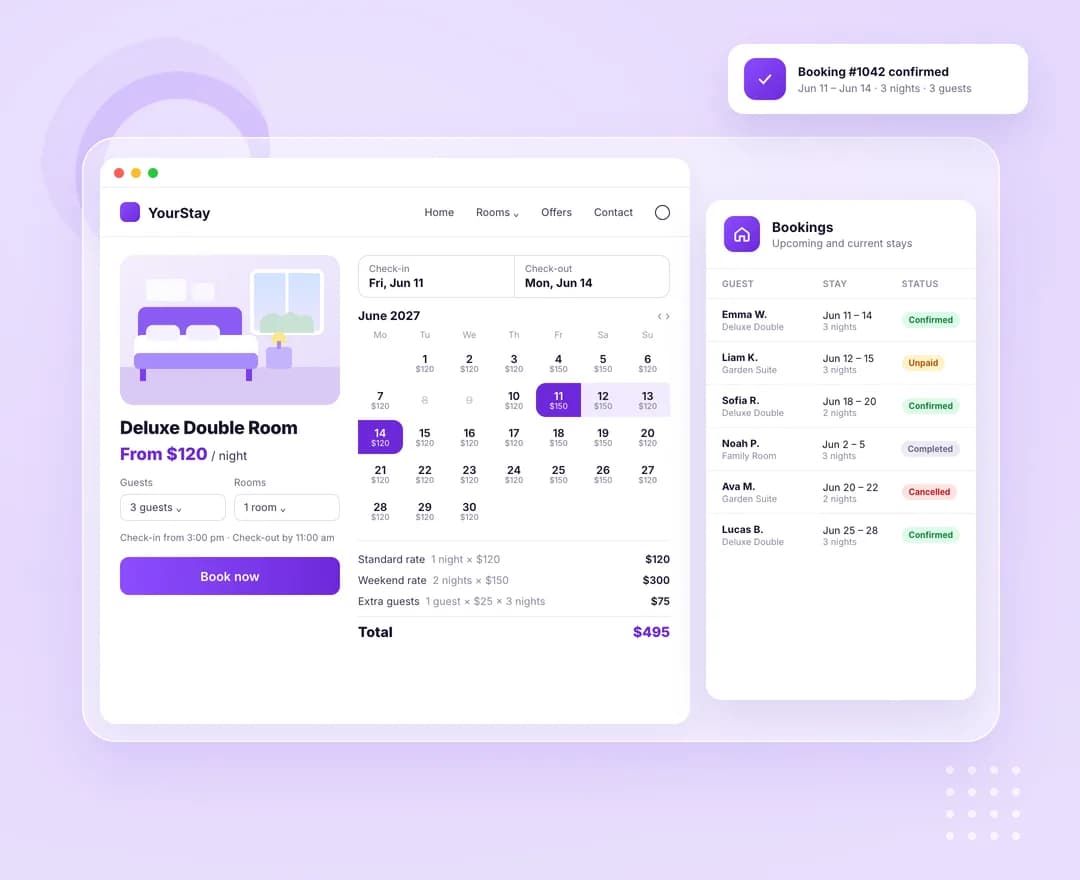
Priced night by night
The regular price is the nightly rate. Friday and Saturday nights can take a weekend rate, and named seasons replace both for their dates — once or every year. The calendar adds it all up as the guest picks dates.
A calendar, not a button
On accommodation products a check-in/check-out range calendar replaces add to cart. Booked-out and blocked nights can't be picked, each day can show its price, and the form totals nights, rooms and extra guests.
The last room sold once
Rooms are counted night by night. Checkout holds them inside a per-product lock, so two shoppers taking the last room at the same moment are served one after the other — the second is asked to try again.
Every stay on record
Each stay becomes a booking under WooCommerce → Bookings that follows its order: payment confirms it, cancelling or refunding cancels it, and an hourly cleanup releases unpaid holds and completes finished stays.
These are the actual options in the plugin — no roadmap items, no “coming soon”.
Rates and stay rules
Set per product, on the Accommodation tab.
- Nightly rate per room — also the product's price for shop sorting and price filters
- Weekend rate for Friday and Saturday nights
- Seasonal rates with a name, first and last night, and an Every year option
- Minimum and maximum nights per stay
- Book at least so many days ahead, and up to so many months ahead
- Check-in from and check-out by times, 15:00 and 11:00 by default
Rooms, guests and dates
Also per product.
- Rooms of this type — identical units you can let on the same night
- Guests per room, 2 by default
- Guests included in the rate, with an extra guest fee per night above that
- Blocked date ranges for maintenance, owner stays or closures
- Upcoming bookings listed on the product itself
Store settings
One panel for every accommodation.
- Button text, Book now by default
- Week starts on — follows the site setting unless you pick a day
- Show nightly prices under each date in the calendar
- Months ahead guests can book, 12 by default and up to 36
- Hold unpaid bookings for a set number of minutes, or follow WooCommerce's hold stock time
B&Bs and guesthouses
One product per room type, a weekend rate for busy nights, and blocked dates for the weeks you close — no separate booking system to keep in step with the store.
Holiday rentals
A yearly high-season rate, a minimum stay, and check-in and check-out times printed on the form, the cart and the order.
Small hotels and hostels
Several identical rooms on one product, guest limits per room and an extra guest fee, with the form setting enough rooms for the party.
Accommodation Bookings is one of 16 WooCommerce extensions bundled inside Atomic Addons — no separate plugin, no separate licence.
All WooCommerce extensions- Product type
- Accommodation, priced per room per night
- Bookings list
- WooCommerce → Bookings, filterable by accommodation and date
- Booking statuses
- Unpaid, Confirmed, Cancelled, Completed
- Checkout
- Classic checkout and the Cart and Checkout blocks
- Order details
- Check-in, check-out, nights and guests on the order line, in emails and My Account
Build what clients imagine
Design without limits and deliver client-ready websites with full control over every detail on every device.